

This method of rebuilding indexes with SQL Server Maintenance Plans only works on the Standard and Enterprise editions of MS SQL Server — the Express edition doesn’t support it.
Check whether to reorganize or rebuild
1
Open the database in SQL Server Management Studio
Select the database containing activity data — typically named
<hostname>.EkranActivityDB.2
Run the fragmentation report
Right-click the database, select Reports > Standard Reports, and run Index Physical Statistics.
3
Read the results
The report lists every index, its current fragmentation level, and a recommended action.
Create a scheduled maintenance plan
1
Start a new Maintenance Plan
In Object Explorer, expand Management, right-click Maintenance Plans, and select New Maintenance Plan. Name it.
2
Add the Rebuild Index task
Drag a Rebuild Index Task from the Maintenance Plan Tasks toolbox onto the plan, and rename it (for example, “Nightly Index Maintenance”).
3
Target the activity database
Edit the task: for a local SQL Server, select Local server connection and choose
EkranActivityDB under Database(s). Leave the task’s other defaults unchanged.4
Schedule the plan
Click the calendar icon to open New Job Schedule, and set a recurrence (for example, nightly at 1 AM).
5
Save the plan
Save the schedule, then save the maintenance plan itself. It appears under Management, alongside its automated job in SQL Server Agent.
6
Test it
Right-click the job and select Execute to confirm it runs correctly.
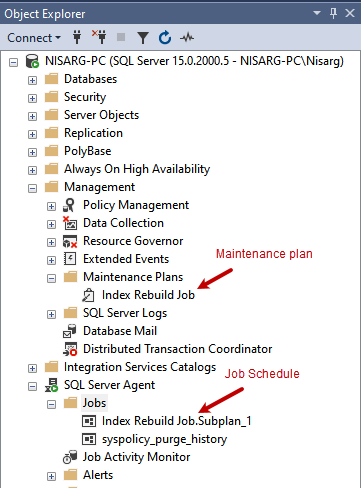
A completed index rebuild maintenance plan and its scheduled job.
Related
Database management
Archive, cleanup, and other database maintenance.
Database server errors
Common MS SQL Server connection issues.