

Main components
- Application Server — the core component. It receives monitored data (screen captures and metadata) from Clients, analyzes it to generate alerts, and stores it in a central MS SQL Server or PostgreSQL database. It also stores configuration data, distributes Client updates, runs database cleanup, and generates reports. It’s controlled through the Syteca Server tray application, which also hosts the Database Parameters tool used to reissue the master certificate or modify database parameters.
- Management Tool — the web-based administrative console. Use it to review monitored data, and manage Clients, users, USB monitoring rules, alerts, the database, and serial keys. It’s accessible remotely from any browser, with no local installation required, and includes the Session Player for reviewing recorded Client sessions.
-
Clients, installed on every monitored endpoint:
- Windows Clients — record screen captures with mouse movement as video, plus metadata (user name, host name, active window titles, application names, URLs, clipboard text, keystrokes).
- macOS Clients — record screen captures with mouse movement as video, plus metadata (user name, host name, active window titles, application names).
- Linux/Unix Clients — record screen captures and terminal input/output, including executed commands.
Other components
- Syteca Master Panel — used in large-scale High Availability deployments to combine data from multiple Application Server instances (on different nodes) into a single viewing interface.
- Syteca SDK — APIs and tools for integrating Syteca with an organization’s own information systems, to exchange business intelligence and other data.
Large-scale deployment options
- High Availability — run multiple Application Server instances for redundancy and load distribution.
- Multi-Tenant mode — isolate multiple customer or business-unit environments within a single Syteca deployment.
- VDI monitoring — monitor virtual desktop infrastructure, including non-persistent (golden image) desktops.
The basic deployment scheme
Maximum visibility across an organization’s infrastructure comes from installing the appropriate Client type on every endpoint — Windows, macOS, and Linux Clients all report back to the same Application Server, and are all managed from the same Management Tool.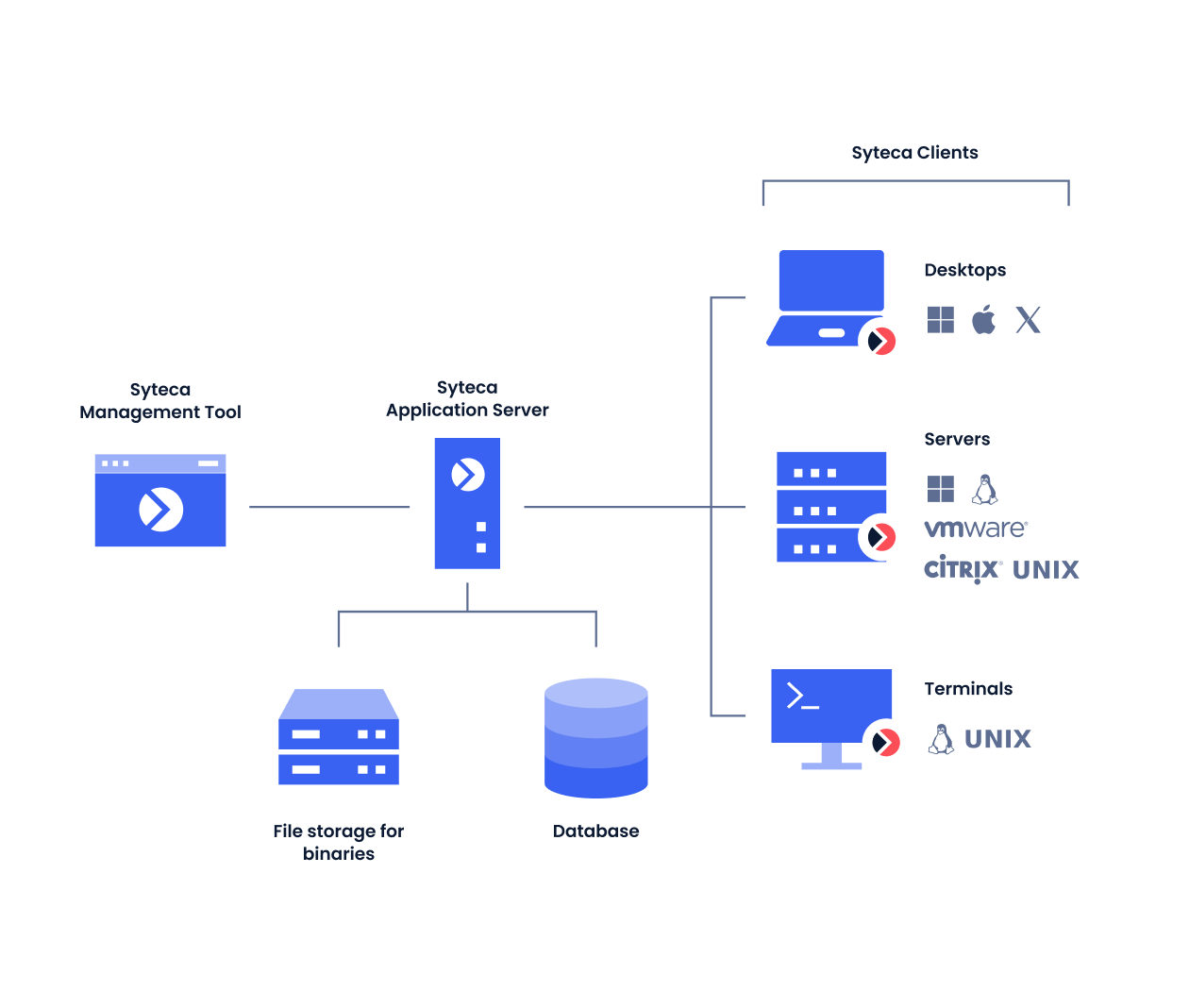
The basic Syteca deployment scheme.
Where Clients get deployed
Clients run on any type of endpoint or server, including:- Infrastructure servers
- Terminal servers
- Jump servers — a single terminal-server Client on a jump server monitors every session that passes through it concurrently, and can also manage access to endpoints within the protected perimeter using the PAM toolset.
- Physical and virtual desktops (VDI) — including Citrix and VMware
Related
System requirements
Hardware and software requirements for each component.
High availability
Deploying multiple Application Server instances.
Multi-Tenant mode
Isolate multiple environments within one deployment.
Getting Started Checklist
Start deploying Syteca step by step.