

Risk Factor Overview
The Risk Factor Overview section contains general information about the selected risk factor.Remediation & Recommendation
The Remediation section provides guidance on resolving the risk factor and eliminating the underlying security issue. The Recommendations section contains security best practices and preventive measures that can help reduce the likelihood of the risk occurring in the future. For more information, see Remediation and recommendations.Top 10 Endpoint Groups
This widget contains a horizontal bar chart showing the endpoint groups most affected by the selected risk factor. The chart displays up to 10 endpoint groups, ordered by the number of endpoints where the risk factor is currently active. Longer bars indicate a greater number of affected endpoints in the group. Clicking a bar opens the Endpoints page filtered by both the selected risk factor and endpoint group. Hover over a bar to view the number of affected endpoints within the group.Only endpoints available to the current user are included in the chart calculations.
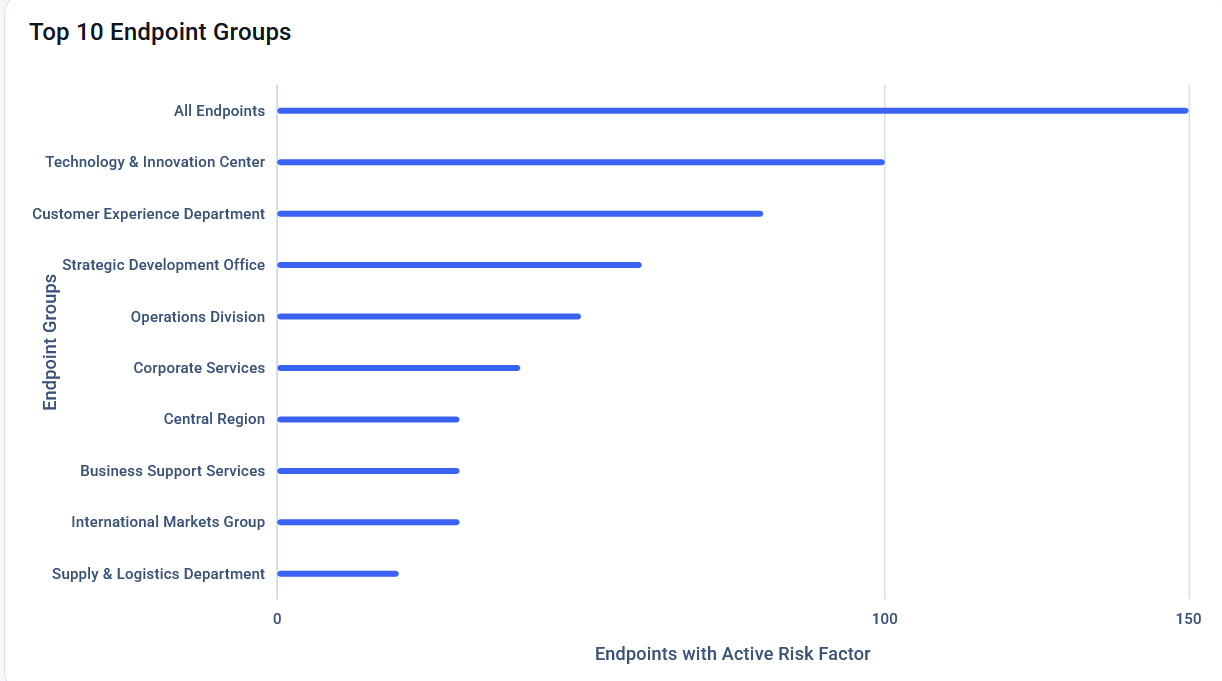
The Top 10 Endpoint Group widget.
Related
About risk factors and probes
Understand how risk factors and probes are evaluated on endpoints.
Dashboard
Monitor your endpoint security posture through widgets that highlight overall health, endpoint group health, active risk factors, and more.
Remediation and recommendations
View detailed remediation instructions and security recommendations for each risk factor to help resolve identified issues and reduce future risk.
How to investigate risk factors
Investigate risk factors affecting an endpoint, review available technical details, and understand the underlying conditions or activities that caused a risk to be detected.